Longtime users of SageACT! CRM software will remember an "old" feature called SideACT, which ran in the taskbar and allowed quick access to some popular task commands. Well, good news for those with much patience - in the new version of SageACT! they've added that back, and now it's called Scratchpad.
28 November 2011


07 November 2011
Use SwiftPage to Send "off-the-cuff" E-mails
Ever wanted to send an impromptu, spur-of-the-moment e-mail using SwiftPage, but did not want to take the time to edit - or create - a template just to send a quick message? You can with a simple, one-time setup that can be used again and again.
24 October 2011
Why not to use your ISP or GMail for E-marketing
One of the first questions I get when setting up a CRM system - either ACT! or ZoHo CRM is "how do I mail merge?". Below are some reasons why you should not use the email merge directly from SageACT or ZohoCRM, and the alternative you should use. Whatever you use, PLEASE do not think you can use your ISP or GMail to send mass emails.
13 October 2011
How to get Help in ACT!
Although SageACT is very user friendly - once you get familiar with it - getting started can be overwhelming for a new user. ACT has a few different areas, and levels, of help available. First, however, if you're looking to convert or customize ACT, unless you have unlimited time and are comfortable in all the areas of ACT, your best bet is to get ahold of a consultant to do this for you. They can do it relatively quickly, and correctly, saving you an incredible amount of time and frustration. You'll be more efficient with your database, and in the end you'll save much more in time and money by getting them to help out. Contact me for more information, but for general "how-to" issues, here's a few areas to keep in mind:
Hope this helps, again, contact me with any questions - I'd love to help...
- In ACT, Help>Online Manuals - there's two reference manuals that help with getting started. The New User Quick Start and Quick Reference Card will assist people in getting familiar with the program itself - where things are and how to access and work in certain areas.
- In ACT again, the Welcome screen (View>Welcome) and Help>Feature Tours are a little more in-depth. Like the title says, these focus on individual features, and help users utilize ACT to work for them, helping them become more efficient.
- Anytime Learning online courses at http://www.sageu.com/act/
anytimelearning/ - again, more in-depth and more focused on specific areas, these are a product sold by ACT and are video based. Very good for "handing off" to a new users so they can learn at their own speed - The online KnowlegeBase - which has very in-depth technical and instructional articles for pretty much anything. Most likely, not something you're going to give to a new users, this is more on the technical side - very detailed information for understanding how the systems works, or troubleshooting issues.
21 September 2011
SageACT! Connect Cloud Service
The new release of SageACT! 2012 makes available an additional product called SageACT! Connect. This is a subscription-based product that syncs *your* individual ACT! database to a hosted site, which then makes the data available to some smartphones, or a portal accessed via a browser. I'll go over some of the basics, and show you how I use it.
13 September 2011
SageACT! Google Integration
September of 2012 marked a new release of SageACT! - version 14, or as most people call is 2012. As an avid Google user - in fact, I run most of my day-to-day activities in GMail and GCal - the addition of Google integration is most welcome.
This post is not so much about the setup and inner workings, rather more of a "what you get" in the integration.
This post is not so much about the setup and inner workings, rather more of a "what you get" in the integration.
20 July 2011
What Does Mobile Access for My CRM Really Mean?
The term "cloud" is a hot button currently - everyone wants their data on/in the cloud, but they don't really know what that means or entails. I often get phone calls that start with "I want ACT! on my phone", or "we'd like to move our CRM to the cloud". Really, what people want is mobile access.
27 May 2011
Sage ACT! ServicePacks and HotFixes
Sage ACT! 2011 hot fixes are cumulative, so the latest hot fix will include the benefits of all earlier hot fixes for this version. It is not required to install earlier hot fixes prior to installing the latest hot fix.
However, you do need to install the SP1. Thanks to Mike Lazarus @ GL Computing for his blog article, which I've blatantly stolen to post :-)
Important: You must apply this hot fix to all machines that share the database – especially when using synchronization. This includes all machines that contain the Main Synchronization Database (Publisher), Main Remote Database (Subscriber), and machines that have the ACT! Network or ACT! Internet Sync Services installed. All machines must have this hotfix applied for synchronization to continue. Check installed version by going to Help and About Act!. Consult with your administrator before applying this in a sync environment.
19 April 2011
ACT to ZoHo Conversion - What Gets Converted
I've spent quite a bit of time this year doing ACT to ZoHo CRM conversions. i.e. People with an existing database in ACT! that they want "moved" - migrated is a better term - to ZoHo. What I'd like to do is provide a short synopsis of what exactly gets converted/migrated, and what to expect in the new system.
23 March 2011
Can't Access ACT! Database Troubleshooting
Have you ever gotten this error:
The database ACT11 demo could not be accessed in order to access this database check your network connection and verify that your database is server is available.While there's many reasons why you might get an error about connecting to ACT! - firewall issues, bad database, network issues - lately (March 2011) there seems to be some commonality to what's happening. I want to share a quick check method to get you back up and running so you can at least keep working.
22 March 2011
ACT for Web from your SOHO
You might know that Sage ACT! has a version that makes your ACT! database available via the web. People often associate this feature with either big offices with their own servers, or a costly hosting solution. Do you know that with just a few configuration changes to your router, you can have worldwide access (secure, of course) to your database that might be hosted in your home, or small office?
08 March 2011
When to Upgrade
I have found that people upgrade for one or two reasons - because there are new features or requirements that their current system does not have, or their current systems does not integrate with newer software.
So, how do you know if you should be upgrading?
So, how do you know if you should be upgrading?
20 December 2010
Integration Between Zoho Apps: Part III
Integration Between Zoho Apps: Part III: "
Related Posts:
Integration between Zoho Apps: Part II
Integration between Zoho Apps: Part I
"
This year we have focused a lot on contextual integration. This includes integration between Zoho Apps as well as integration with external apps. I want to briefly highlight some of the new integrations between Zoho Apps (also check Part I, Part II).
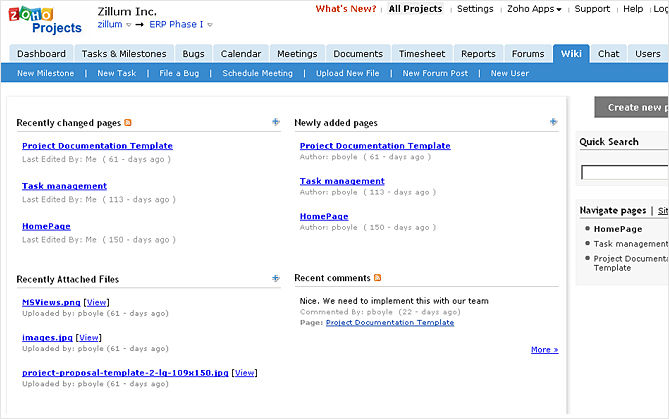
Zoho Wiki Integration with Zoho Projects
Zoho Wiki & Projects are two different types of collaboration tools. But when you have a need to collaboratively create content, then our Zoho Wiki integration with Zoho Projects can be really handy. Content can now be created in the context of the project you are working on. More details on this integration is available here.
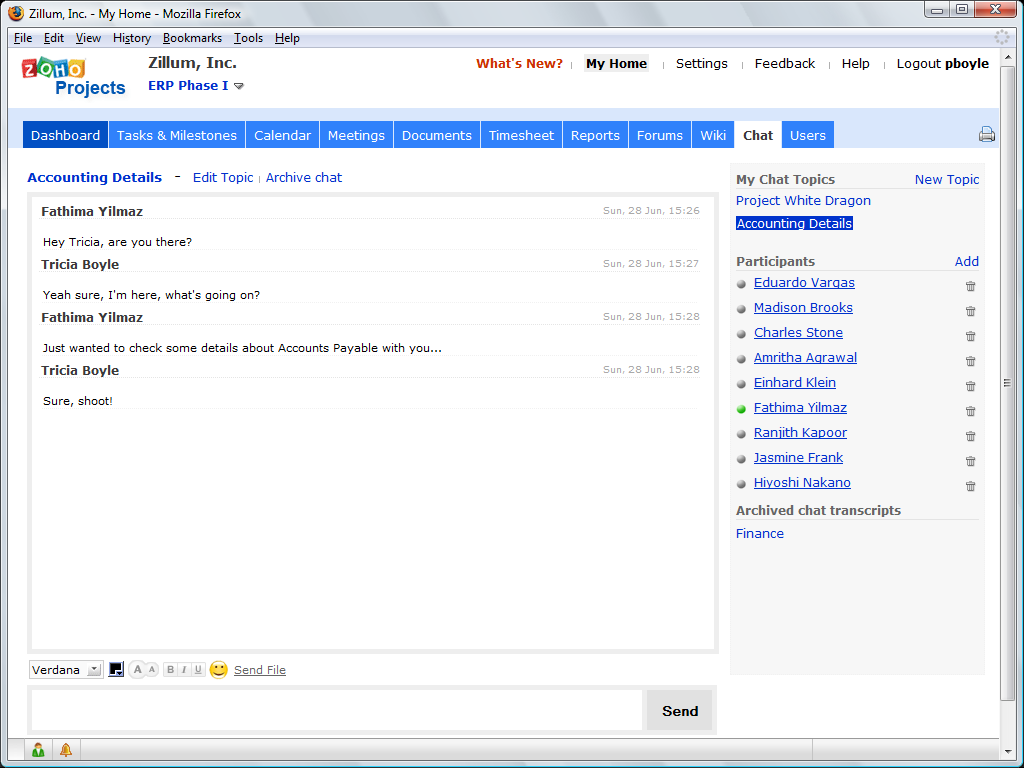
Zoho Chat integration with Zoho Projects & CRM
As we mentioned previously, Zoho Chat is one of those apps that is integrated with most of our apps. This year, we integrated it with Zoho Projects as well as Zoho CRM. In case of Zoho Projects, we also enabled group chat between members of the project. More info here.
Zoho Creator integration with Zoho CRM & Invoice
Integrating Zoho Creator with our business apps is a frequently requested feature. We started this effort by taking some small initial steps by integrating Creator with CRM (more details) and Invoice (more details). Moving forward, we plan expand this integration.
Zoho Reports integration with Zoho Creator
While Creator is integrated with other Apps on one side, we also have complementary apps like Zoho Reports integrate with Creator. Users collect lots of data using their Creator apps. If you need to build reports from the collected data, you can do so with our Reports integration. More details are available here.
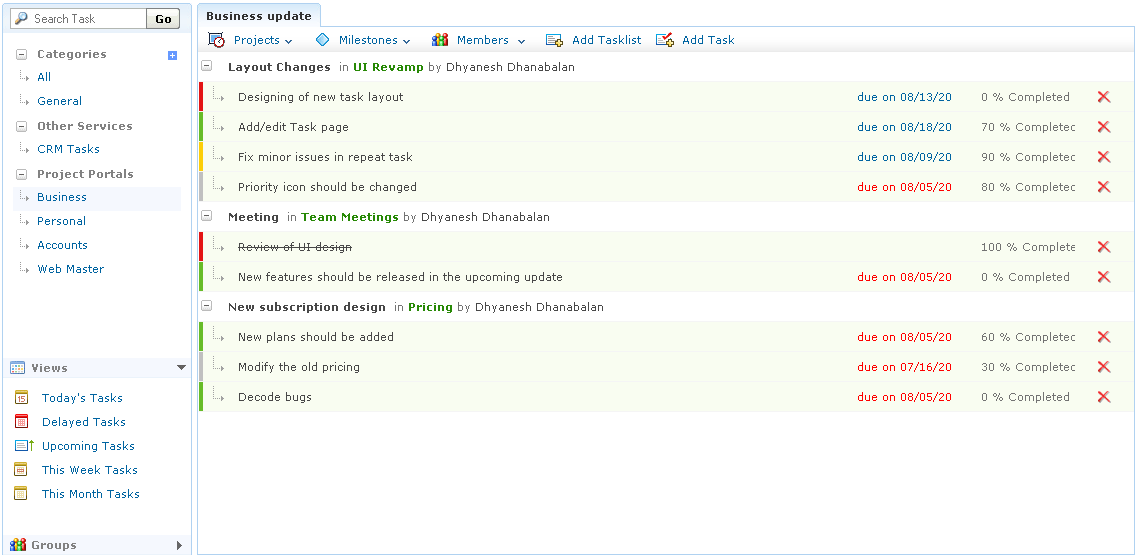
Tasks Integration with Projects & CRM
Zoho Tasks is one of those small applications that is part of our Zoho Mail Suite. We also have Tasks option in some of our other apps like CRM, Projects etc. We integrated tasks from other apps in Zoho Tasks providing an aggregated view of all your tasks.
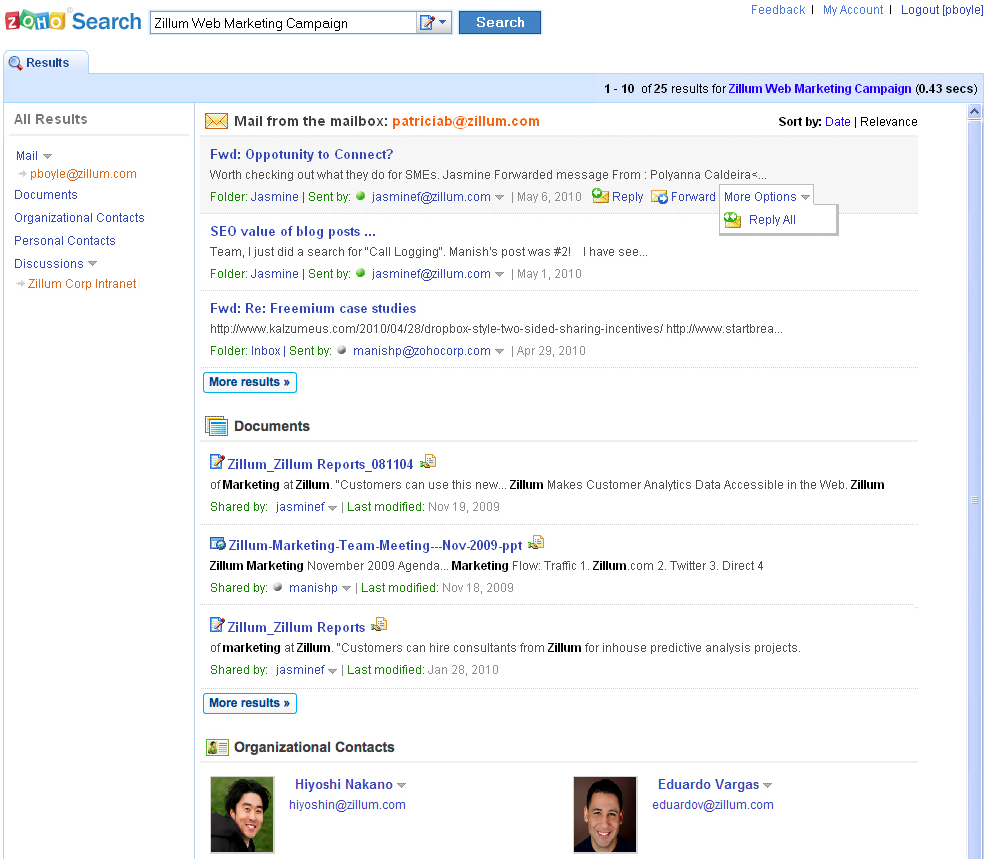
Zoho Search
We launched Zoho Search this year. While a typical Search cannot be called integration, our actionable search is different. From the search results page, it opens the relevant application to open the content. An email result found in search is opened with Zoho Mail with options to respond to the email. Similarly, a document can be opened directly from a search result and can even be shared with other users right from the search interface. More information is available here.
Zoho Mail & Zoho CRM
We talked about this couple of times, but is worth another mention. Email integration with CRM can be great if done right. But there are many many vendors doing CRM and Email. As we do both, this puts Zoho in a unique position and we are able to integrate Zoho CRM with Zoho Mail as well as other email systems.
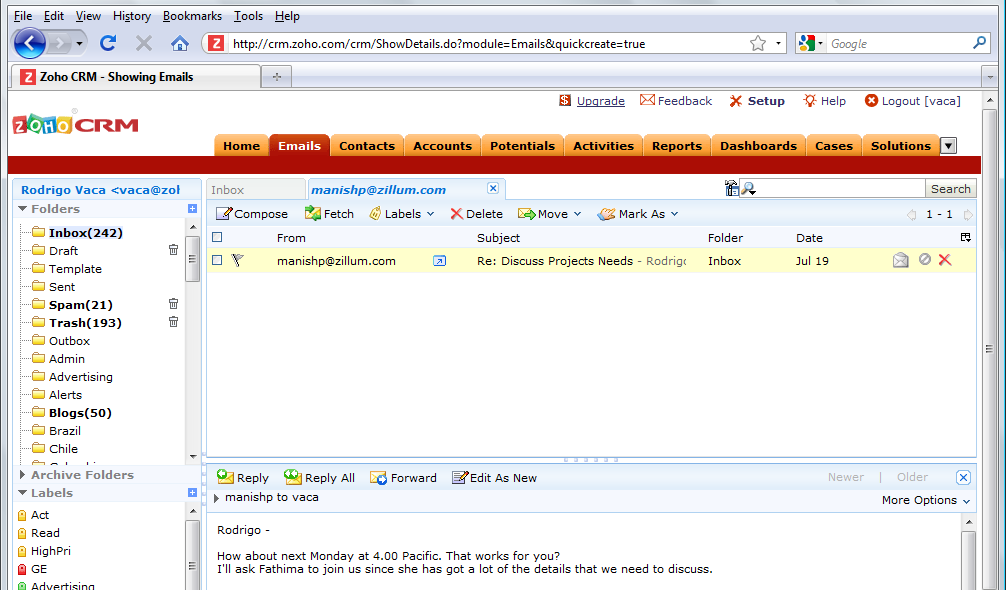
When you view the contact information of your customer in CRM, won't it be useful to also view the email exchanges you have had with that customer and may be even send out an email right from the CRM system? That was the thought behind this integration and we now have a good tight integration between these systems. More information about this is available here.
Related Posts:
Integration between Zoho Apps: Part II
Integration between Zoho Apps: Part I
"
17 October 2010
Link to Folder from Contact Field
If you have a folder for a client, or a folder of important documents, and don't necessarily want to attach each and every document to an ACT! record, this field use "trick" will help. Using a URL field, you can actually type in a directory path, and - when clicked - will open an Explorer window to that directory.
04 October 2010
Updated Free Group Count AddOn Released
I've released an update to the free Group Count AddOn. The new version keeps the functionality of the original - to quickly view a count of a Group and it's sub-groups - but adds a few features requested by users.
Specifically:
Specifically:
- it will create a Group_Count field that can be added to a layout or a column in the Group List view
- creates a new menu item that goes through all the groups and subgroups, counts members, and puts the value in the Group_Count field, or in a Note under the Group record (depending on type of database)
- it auto-sizes the bottom left panel on the status bar - which allows you to view the entire group name instead of cutting it off
- additionally, in that lower left panel, it also automatically shows the number of contacts in the current group [e.g. "Customers has 141 members"] as you click on each group
20 September 2010
Sage ACT! 2011 Premium Review from PCMag.com
Sage ACT! 2011 is less of an overhaul than an enhancement of last year's excellent offering. Improved Outlook integration, excellent SMB services, and general improvements throughout make the latest ACT! the ultimate contact management tool.
15 September 2010
Lookup Contact Activity - Keep track of who's slipping through the cracks
There's a somewhat hidden search option in ACT! that allows you to search almost all areas of a contact record for the last time that contact was edited. This search option can help you find those contacts that haven't been "touched" in a while, and not let them slip away.
01 September 2010
Professionals, amateurs and the great unwashed
If you want something done, perhaps you would ask a professional to do it. Someone who costs a lot but is worth more than they charge. Someone who shows up even when she doesn't feel like it. Someone who stands behind her work, gets better over time and is quite serious indeed about the transaction.
Or perhaps you could hire a passionate amateur. That's a forum leader doing it for love, not money. An obsessive in love with the craft. A talented person willing to trade income for the chance to do what he loves, with freedom.
Please, though, don't hire someone who just thinks it's a job. This category represents the majority of your options, and this category is what gives work a bad name.
25 August 2010
Editing Drop Down Lists
One of the best ways to make ACT! by Sage "your own" and speed up data entry, and searching, is to customize drop-down boxes field choices - or List Values - to better match your business needs. Eliminating excess tags, or changing existing values cleans up the screen, and gets you to important data quicker.
10 August 2010
ACT! E-marketing Extreme Makeover
ACT! E-marketing is getting an extreme makeover with the upcoming launch of Sage ACT! 2011, starting with its name. From now on, our E-marketing service will be known as 'Sage E-marketing for ACT!.' This will help us be consistent when we roll out additional services for E-marketing and other categories.
Along with the name change, Sage E-marketing for ACT! will have a new icon on the contact, company, and group toolbars - a more stylized version of the current users have seen, which conveys a greater sense of motion or action as well as a consistent style with other ACT! icons. Go check it out!
But the makeover doesn't end there - there's lots of new features inside Sage E-marketing for ACT!, including:
Along with the name change, Sage E-marketing for ACT! will have a new icon on the contact, company, and group toolbars - a more stylized version of the current users have seen, which conveys a greater sense of motion or action as well as a consistent style with other ACT! icons. Go check it out!
But the makeover doesn't end there - there's lots of new features inside Sage E-marketing for ACT!, including:
- Integration with Smart Tasks Sage E-marketing comes integrated with ACT! 2011 smart tasks out of the box. When you're designing smart tasks, you can easily add a step to send an e-mail or add a contact to a drip campaign and directly access your email templates and campaigns. Talk about a personal assistant!
- Ability to edit imported templates At long last! Sage E-marketing for ACT! now includes an Advanced Editor which can edit imported templates. Instead of having to make edits using the source tool and re-import, customers will be able to apply edits to the already imported templates. Customers who regularly import templates are going to love this!
- Landing pages You can now publish email templates as landing pages, bringing sophisticated campaign capabilities to your fingertips. Don't have time or money to add web pages to your website? Create them instantly and let Sage E-marketing for ACT! host them for you!
- A new template manager Sage E-marketing for ACT! has a new template manager which makes your life much easier. Organizing, publishing, and distributing email templates is much easier. And you can upload images and documents into a library for repeated use. Speaking of documents - you can now link PowerPoint, Excel, and text files to your templates in addition to pdfs!
Subscribe to:
Posts (Atom)
